Online Safety Video – Digital Wellbeing

October Video:

This month’s theme is Digital Wellbeing

Description: This video provides a quick overview on how to help children build healthier tech habits.


You can access the video below:

Reminder – Parent E-Safety Session

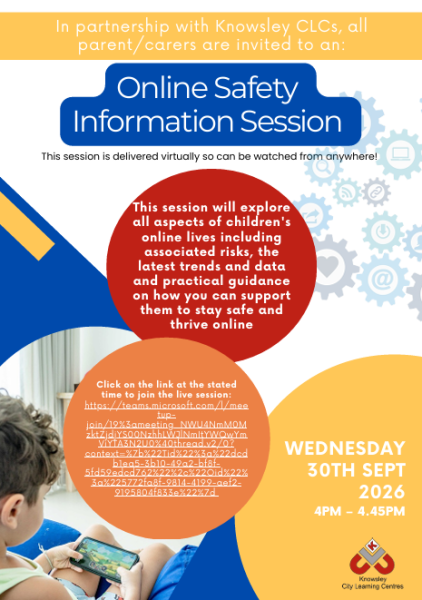
Please find below the link to access the parent/carer session scheduled for next Wednesday 30th September 2026: 4pm – 4.45pm.

https://teams.microsoft.com/l/meetup-join/19%3ameeting_NWU4NmM0MzktZjdjYS00NzhhLWJlNmItYWQwYmViYTA3N2U0%40thread.v2/0?context=%7b%22Tid%22%3a%22dcdb1ea5-3b10-49a2-bf8f-5fd59edcd762%22%2c%22Oid%22%3a%225772fa8f-9814-4199-aef2-9195804f833e%22%7d

This terms focus: This session will cover all aspects of children’s online lives and will cover the associated risks, the latest trends and data and guidance on how you can support their online lives.

You do not need to register, they simply click on the link at the above time to access the session.  Cameras and voice/audio will be switched off for all attendees.  Attendees can ask questions by typing in the Q&A box, but this will be explained during the session.

The event will be streamed using Teams.  Attendees can watch the live event in:

  • Teams app—desktop (Windows or Mac) or mobile. (The Teams app is free to download if attendees would like to do that beforehand).
  • If they don’t have Teams they can access it via one of the following browsers – Google Chrome, Microsoft Edge or Firefox.

As a reminder, this session will be recorded and will be subsequently shared so if you cannot make the live session then you can watch it back at a time that is convenient to you.

E-Safety Parent Session

Please find below the link to access the parent/carer session scheduled for next Wednesday 30th September 2026: 4pm – 4.45pm.

https://teams.microsoft.com/l/meetup-join/19%3ameeting_NWU4NmM0MzktZjdjYS00NzhhLWJlNmItYWQwYmViYTA3N2U0%40thread.v2/0?context=%7b%22Tid%22%3a%22dcdb1ea5-3b10-49a2-bf8f-5fd59edcd762%22%2c%22Oid%22%3a%225772fa8f-9814-4199-aef2-9195804f833e%22%7d

This terms focus: This session will cover all aspects of children’s online lives and will cover the associated risks, the latest trends and data and guidance on how you can support their online lives.

You do not need to register, they simply click on the link at the above time to access the session.  Cameras and voice/audio will be switched off for all attendees.  Attendees can ask questions by typing in the Q&A box, but this will be explained during the session.

The event will be streamed using Teams.  Attendees can watch the live event in:

  • Teams app—desktop (Windows or Mac) or mobile. (The Teams app is free to download if attendees would like to do that beforehand).
  • If they don’t have Teams they can access it via one of the following browsers – Google Chrome, Microsoft Edge or Firefox.

As a reminder, this session will be recorded and will be subsequently shared so if you cannot make the live session then you can watch it back at a time that is convenient to you.

Swimming Schedule – Autumn Term

We are delighted to see weekly swimming lessons begin in school for all our children from Year 1 to Year, making full use of the new year-round swimming facilities that have been upgraded over the summer holidays.

Schedule:

  • Tuesday
    Year 1 Supernovas/Cosmic Comets (Taught by Mrs Evans in a morning)
    Skyflyers (year 3 and 4)
    Adventurers (Year 5 and 6)
  • Wednesday
    Year 1 Shooting Stars/Cosmic Comets (Taught by Mrs Ashworth in a morning)
    Stargazers (Year 3 and 4)
    Voyagers (Year 5 and 6)
  • Thursday
    All of year 2 (Taught by Mrs Warren in a morning)
    Starships (Year 3 and 4)
    Explorers (Year 5 and 6)
  • Children from the Horizon HUB will take part in sessions across the week

Please see the letter below for further details.

Swimming Schedule – Sept 2026

Don’t forget the pool is open to the public outside of school hours – this is managed by Maverick Sport, who should be contacted directly for bookings.

Maverick Sport Facebook Page Maverick Sport Booking Page

June E-Safety Video – Online Scams & Digital Footprints

This month’s theme is Online Scams & Digital Footprints.

Description: This video provides a quick overview on online scams targeting young people and the importance of digital footprints.

knowsleyclcs.org.uk/wp-content/uploads/2026/05/Scammers-and-Digital-Footprints-June-2026.mp4

Parent/Carer Online Safety Session – 06.05.26

Please find below the link to access the parent/carer session scheduled for next Wednesday 6th May 2026 (4pm – 4.45pm). 

https://teams.microsoft.com/l/meetup-join/19%3ameeting_ZWMzYzRmYTYtMDk0NC00MWQ0LWIyMDctNjYzYzNkZTI0MGJj%40thread.v2/0?context=%7B%22Tid%22%3A%22dcdb1ea5-3b10-49a2-bf8f-5fd59edcd762%22%2C%22Oid%22%3A%225772fa8f-9814-4199-aef2-9195804f833e%22%2C%22IsBroadcastMeeting%22%3Atrue%2C%22role%22%3A%22a%22%7D&btype=a&role=a


Focus: Guide to social media and livestreaming – this will include latest trends and emerging threats and will focus on developing your understanding of social media and livestreaming, the associated risks and steps we can take to support our children.

Attendees do not need to register, they simply click on the link at the above time to access the session.  Cameras and voice/audio will be switched off for all attendees.  Attendees can ask questions by typing in the Q&A box, but this will be explained during the session.

The event will be streamed using Teams.  Attendees can watch the live event in:

  • Teams app—desktop (Windows or Mac) or mobile. (The Teams app is free to download if attendees would like to do that beforehand).
  • If they don’t have Teams they can access it via one of the following browsers – Google Chrome, Microsoft Edge or Firefox.

As a reminder, this session (and all virtual sessions) will be recorded and will be subsequently shared so if you can’t make the live session you will be able to watch it back at a time that is convenient to you.